
This post was last updated on March 16th, 2026 at 02:17 pm
If you’re interested in dramatically reducing your screen time, both the Light Phone III and Sunbeam F1 Pro can help you do that. Both are great dumbphone options, though I’ve started to call them anti-smartphones. “Anti-smartphone” is more fitting because they were created with the intention of providing helpful tools, such as GPS, while cutting out the distractions.
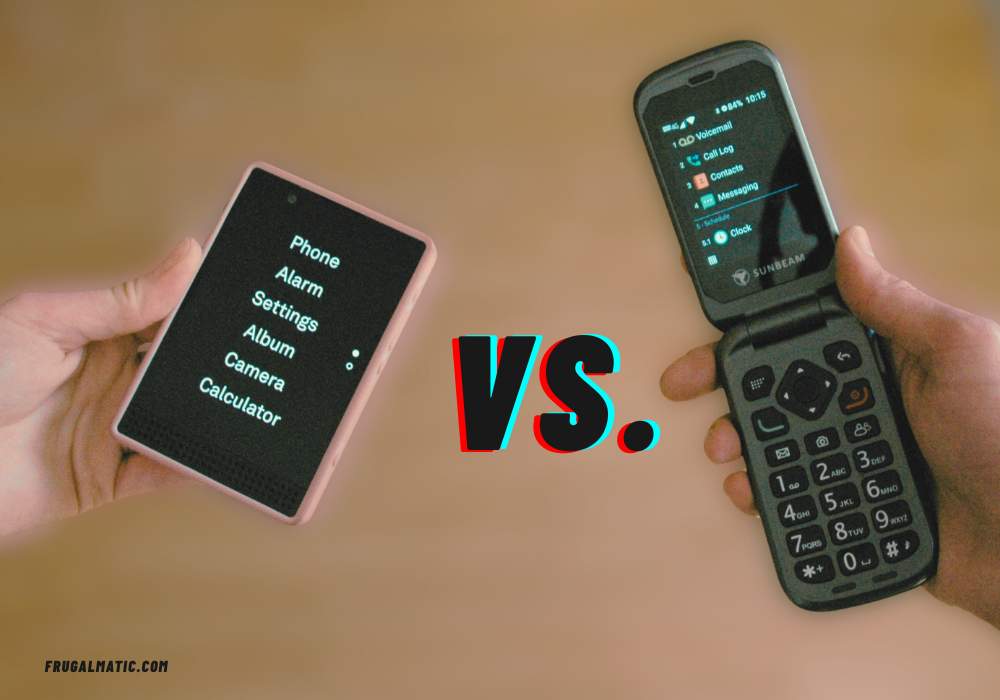
The Light Phone III ($699) and Sunbeam F1 Pro ($329) have both received positive reviews. They go about accomplishing their goals a bit differently, however. This post will highlight those differences and hopefully help you decide which one best suits you, or your daughter.
Form factor
The most glaring difference between the Sunbeam F1 Pro and Light Phone III is the form factor. Our daughter prefers the Light Phone III, in large part because of its sleek design. It’s almost a hybrid: a combination of candy bar (like the first Nokia phone) and monolith (like the smartphone). It features a traditional touchscreen, though black and white only. No color. There’s also a small dial on the side for adjusting screen brightness, lending a kind of industrial punk feel. If you press the dial button, the flashlight turns on.
The Sunbeam’s personality is unapologetically old school. It’s a flip phone, and it causes our daughter to sometimes wince when I open it in public. I laugh whenever I hold the phone in the air to take a photo, and she’ll try to stop me. God forbid anyone see just how behind the times I am.
But, of course, Sunbeam users are confident in their choice. We are so far behind the times that we’re ahead of the times. We’ve known for years that smartphones are addictive, before there was any talk of predatory algorithms or lawsuits filed over social media. We’ve known all along that the whole point of a smartphone was to distract us and pull us away from the task at hand, whatever that task may be.
But back to the review….
Another thing to note about the form factor: I love the Sunbeam’s compact size. I can easily slip the Sunbeam F1 Pro into my front pocket and keep it there alongside my keys. To be fair, the Light Phone III fits fairly easily into my front pocket, too, just not quite as compact as the Sunbeam. Both are less bulky than any smartphone slab.
Finally, I must highlight this Sunbeam design features: two cute little icons on the front, which light up when you have a voice mail or text message or a missed a call. They function as notifications, except in the form of a LED. When you have your phone in its charger, you can see the icons light up from across the room. With the Light Phone III (and smartphones for that matter), you usually have to “wake up” the phone and look down on it to see whether you missed a call or have messages. The Sunbeam acts more like an answering machine (remember those?), which showed a red light when you had a message.
Texting
Despite being a flip phone, the Sunbeam has a touch screen. I do most of my texting on this screen, not the physical keys. I rely heavily on its T9 function, which predicts words as I type them and significantly cuts down on typing time. It’s an old technology but still very useful.
The Light Phone III comes with a larger screen, and our daughter says it’s easier to type texts on the Light Phone III. However, it does not have a traditional T9 function.
Both phones allow for group texts.
Both phones also come with a voice-to-text tool. However, you must be a premium subscriber to access Sunbeam’s voice-to-text tool. It’s available for $3.50 a month. You don’t need a subscription to use the Light Phone III’s voice-to-text tool, which puts a check mark in the Light Phone’s favor.
Both phones also allow you to send audio texts. With the Light Phone III, click the audio icon within your text thread to send an audio recording up to one minute long. With the Sunbeam, you have to record your message within the Sound Recorder tool, and then you can share the recording via the tool’s menu options. So, there’s a couple more steps involved with Sunbeam but very doable.
Photos
You’re never going to use the Sunbeam for a professional photo shoot, though I cannot recall the last time I needed a high-quality photo. Its 5 megapixel camera is adequate for everyday use, such as snapping photos of documents or electrical wiring (which I had to do the other day while fixing our dryer).
The Light Phone III features a 50 megapixel camera and is perhaps the best anti-smartphone camera on the market. However, our daughter complains that photos sent via text appear grainy, though the photos stored on her phone are high quality. The Light Phone may be heavily compressing photos sent via text to accommodate different phone carriers, according to some Reddit users. You can transfer the high-resolution files from the Light Phone to a computer.
Video
The Sunbeam doesn’t take video. My workaround for this is to use a separate video recorder, such as a GoPro. Admittedly, when I need video taken, I’ll often ask my wife to record something on her smartphone. And then she’ll give me this look that says, “You need to get a smartphone.”
Cue awkward pause….
The addition of both a camera and video recorder represents the biggest upgrade to the Light Phone III, from the Light Phone II. Our daughter enjoys the video recorder and finds it easy to use. She describes both the audio and video quality as “good.”
Music
I’m not the best person to review Sunbeam’s music player because I don’t listen to music on it. Music can be uploaded to the phone from a computer via a microSD card, which you access by opening the phone’s back panel. Or, you can hook up the phone to a computer via a USB data cable. I like to use a radio and just carry it around the house, mostly listening to Brewer games. That’s all I need.
Our daughter listens to music on her Light Phone III, and she uploads music through her online Light Phone account that comes with the phone purchase. This makes it easy to put music onto the phone without having to fiddle with a memory card. In fact, there is no microSD card slot on the Light Phone III. The phone itself comes with 128GB of storage.
She wishes her phone could access Spotify, and some Light Phone III users have lamented the lack of a music streaming app on the Light Phone III. There are some reports of users circumventing the phone’s operating system and placing Spotify on their phones! I don’t personally recommend such behavior. If you want Spotify that badly, just get a smartphone (though our daughter doesn’t have that choice). You aren’t ready for an anti-smartphone device yet, in my not-so-humble opinion.
GPS tools
Both the Light Phone III and Sunbeam offer their own customized GPS tools. I’m a big advocate of using physical maps to navigate, but I admit to using Sunbeam’s GPS system once in a while.
Along with Sunbeam’s own GPS tool, called Navigator, it offers a Google-owned GPS tool called Waze. They’re both adequate, though inputting information into the Waze tool is a little tricky because of the small flip-phone screen. You definitely want to set up Waze before leaving home, or have one of your kids take charge of the device once you’re on the road.
Our daughter has used the navigation tool for the Light Phone III only a couple times, probably because she thought I was lost. And I probably was. The larger screen on the Light Phone III makes it easier to view.
Various Other Tools
If you want to look up their tools, feel free. I’m not going to go through the complete list, but I will say that the Sunbeam comes in several different versions, and each version offers a different set of tools. I have the Aspen version. One tool that I noticed is not on the Light Phone III but is on the Sunbeam Pro (the Aspen version, at least) is a weather app.
What future tools might looks like
One of my biggest frustrations with these anti-smartphones is the battle you must wage with businesses and entities that use apps to provide access to their services. These are what I call “digital gates.” Many stadiums and ball fields accept only e-tickets nowadays, and it would be great if someone could find a way to allow these anti-smartphone devices to carry e-tickets.
Light Phone is looking into creating a digital wallet and placed the necessary hardware on its phone to do it. However, making a digital wallet is a huge project because it requires coordination with ticketing and financial companies. Remember, Light Phone is a little company and doesn’t have the clout that Apple does. So, we could be waiting a few years.
Batteries
Truth be told, I’ve had some issues with the Sunbeam battery. I’ve had two batteries die in the past three years. The good news is the battery is easily replaced and relatively cheap, at just $20. With a smartphone, you end up having to buy a whole new phone if the battery conks out. I hate to be too critical because it’s possible that I’ve just been unlucky. Batteries can be weird. It’s like that Forrest Gump line: “You never know what you’re gonna get.”
The Light Phone III is also designed to have a replaceable battery. Light Phone says it plans to sell one in the future. If for some reason your battery dies in the meantime, you may need to contact their support staff to buy one.
Operating System
Finally, both the Sunbeam Pro and Light Phone III have customized operating systems layered on top of the Android Open Source Project: BasicOS for Sunbeam and LightOS for the Light Phone. As I mentioned before, there are reports of people bypassing the LightOS and inserting apps that don’t belong. I haven’t heard of any reports of people doing that to the Sunbeam. Light Phone has stated that bypassing its OS would void warranty, for whatever that’s worth.
The main concern here would be for parents who are considering the Light Phone III for their child, to keep them off the internet. A tech savvy teen could hop onto YouTube and learn how to get around the LightOS. Of course, I fully trust our daughter not to tinker with the device. 🙂
Related to their operating systems, both companies regularly release software updates.
So, which one is best for you (and me)?
I’ve actually thought about buying a Light Phone III, but there’s something likable about a flip phone. Snapping it shut is so satisfying. Plus, the Sunbeam’s form factor makes a bigger statement than the Light Phone’s, if you care about statements. Believe it or not, some “dumbphones” are designed to look like smartphones, such as the Wisephone. But I think the Wisephone invites confusion. People expect you to be able to do certain things on smartphones. With a Wisephone, you have to explain that your phone isn’t set up to do “smartphone” things, even though it looks like a smartphone.
The Sunbeam automatically sets expectations for everyone around me. Nobody in my life, whether family or co-workers, expects me to be able to use my phone as a smartphone. The flip phone is a loud declaration that you have set strict limits. No explanation necessary. And if people don’t like it, well, then you deal with them on a case-by-case basis. I’ve been challenged, but every time I find a workaround, even if it means occasionally asking my wife to use her smartphone, which some might view as cheating.
The younger, cooler generation (the hipsters), they’re probably going to lean toward that Light Phone III. It’s sleek. And I will say this: If the Light Phone develops an app that would allow me to access e-tickets, I’d probably switch to it, even if it were to suddenly make me look trendy and hip (which I wouldn’t want to be). I’m a little like Groucho Marx in that sense: “I’d never join a club that would allow a person like me to become a member.” I’ve had a lot of good laughs with my daughter over my flip phone, and I intend to keep those laughs coming. She empathizes with me, even while she’s mortified by my technological selection. Someday she’ll understand.